Click For Latest Patch Notes
Patch: Nonograms (June 2026)
🧩 Introducing Nonograms: a Whole New Puzzle Mode
Our first puzzle mode beyond Sudoku is here. Nonograms join the game with their own play board, puzzle balls, hints, and a full set of intro puzzles to get you started.
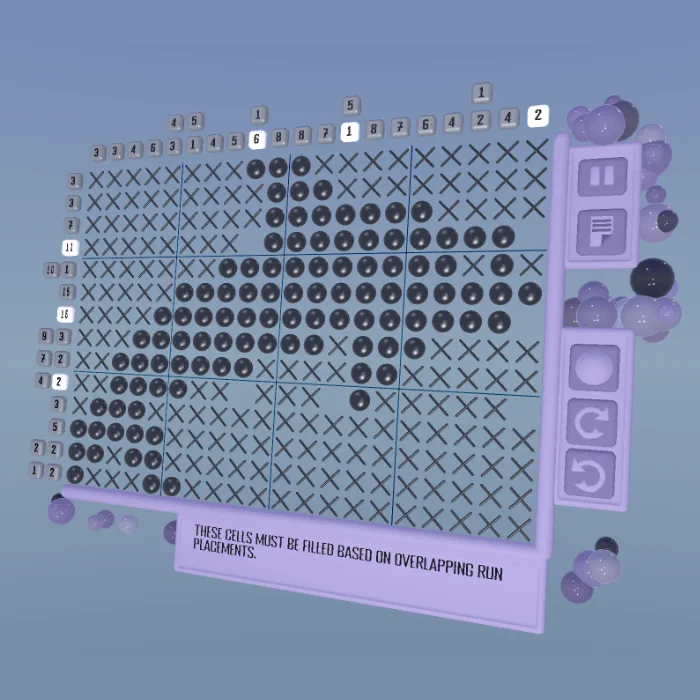
New to nonograms? A nonogram is a picture crossword. The numbers beside each row and above each column are the clues: each number is a run of filled squares, given in order, with at least one empty square between runs. Work one line at a time, cross-referencing each row against the columns it crosses. Marking a square empty is every bit as useful as filling one… and once the logic is solved, a little pixel-art picture appears. No timers, no game-overs, just follow the logic and the picture shows up.
Fun fact: nonograms were invented in Japan in the 1980s by Non Ishida and Tetsuya Nishio, working independently at the same time. When the puzzles first reached the UK they were named “Nonograms” in honour of Non Ishida, and that’s the name we Brits have used ever since. You may also know them as picture crosswords, Hanjie or Griddlers.
Here’s what the new mode brings:
- Smart, readable clues. Row and column clues highlight the line you’re hovering, grow larger so they’re easy to read, and gently fade out once you’ve satisfied them. Clues that share more than one block per line are now displayed clearly.
- A brush you can flip and measure. Tap the brush to flip between fill and mark; hold or drag to see a live ruler showing exactly how long your line will be, with a ghost preview of the result before you commit.
- Helpful error feedback. If a cell breaks a row or a column, only that line turns red, so you can see precisely where you went wrong instead of guessing.
- Clearer hints. Nonogram (and Sudoku) hints now tell you the row or column and value they refer to, and the solver gained several new human-style solving techniques behind the scenes.
- A cleaner board. Grids now stretch to fit, with subtle divider lines every five cells to help you count, plus refreshed frame, hint, pause, undo/redo, brush and note controls.
- Replay your solve. Finished nonograms (and Sudoku) now play back your solution on the results screen.
Puzzle Balls & Interaction
- Fresh puzzle balls. New Nonogram puzzle balls and an updated Sudoku ball, both reading more clearly at a glance, with refreshed materials and lighting.
- Glossier, better-looking pieces. Cells and balls have a richer, glossier look with a soft rim highlight, and their colours now respond to hover, error, and add/remove/set states.
- Fewer missed taps. Puzzle balls have a slightly larger hit area, and the title logo and puzzle-pack panels got better collision so they’re easier to grab.
Revamped Title Screen
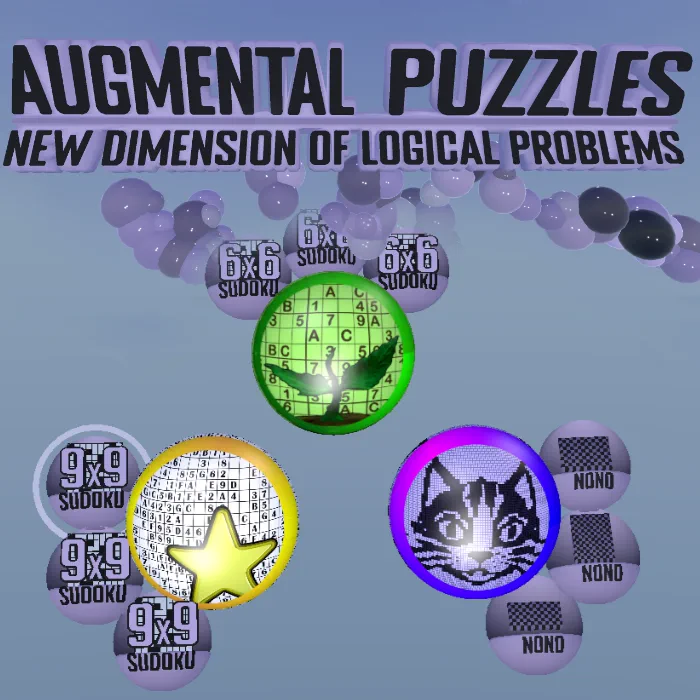
- Streamlined menu flow. We have reworked the title screen to showcase your puzzle packs right up front, cutting out unnecessary steps.
- Instant puzzle access. Jump directly into solving with convenient, one-click puzzle balls accessible straight from the main menu.
- Enhanced guidance. Brand-new help screens packed with extra tips, tricks, and UI improvements ensure a smoother experience throughout the entire game.
Audio
- The whole game has a voice now. Buttons, grabs, sliders, toggles and the scratchpad all give satisfying audio feedback, undo/redo have their own cues, and the tutorial responds to how well you’re doing. Sliders even change pitch as you move them.
- No more silent shuffling. Music no longer churns through tracks while the Music channel is muted.
Tutorial
- Tutorial fixes. Pencil marks no longer vanish when you enter a symbol, the tutorial reliably progresses past the Naked Pairs lesson, and Get Hint no longer gets stuck, so the whole walkthrough flows correctly.
- Gentler wording. Language around mistakes has been softened to feel less punishing.
Settings & Menus
- Reworked settings panels with a cleaner tabbed layout, fixed tab collision so tabs always respond, and settings that automatically match whichever puzzle type you’re currently playing.
- Refreshed title screen with new art and a message of the day, plus a short new How-To page for nonograms with tidied-up rules text.
- Scratchpad colour fixes. Fixed overlapping swatches and colours that were rendering too dark in the colour picker.
- Skip Tutorial button text is now legible.
- Keypad tweaks. Repositioned every keypad size (6, 8, 9, 10, 12 and 16 keys) for a better reach.
Content & Daily Challenges
- A fresh June puzzle pack of daily puzzles.
- Daily Challenge now offers both Nonogram and Sudoku puzzles.
Coming Soon
- More modes. Nonograms is just the first, so vote in game for what you’d like to see next.
Click For Previous Patch Notes
Proudly powered by the Godot Engine for a native, high-performance VR experience.