Patch: Think in Ink — May 2026
🖊️ Logitech MX Ink Stylus Support
Pick up your Logitech MX Ink and Augmental Puzzles knows. The stylus is detected automatically and the controller model swaps out for a proper pen, with tip pressure and side buttons wired in for natural writing and erasing.
Put the pen down and your standard Quest controllers take back over. No menu fiddling, no settings page — it just follows whatever’s in your hand.
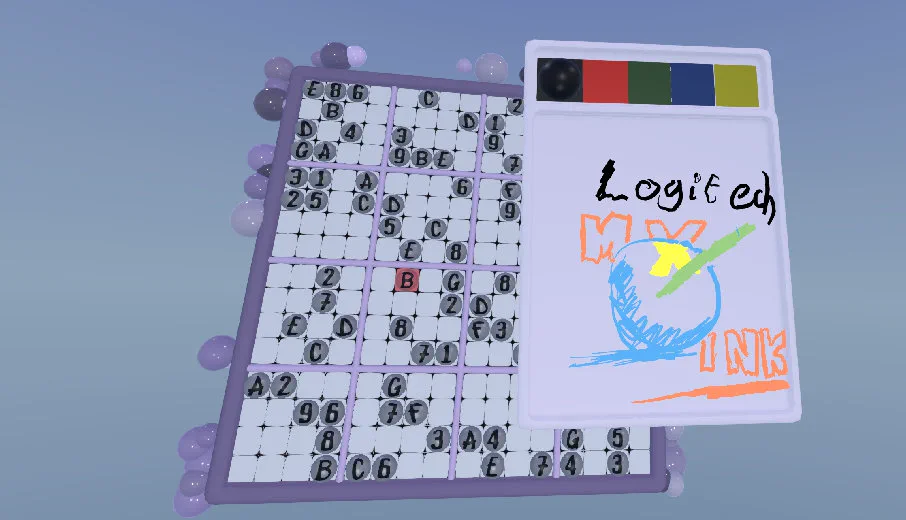
✏️ Scratchpad — Think in Ink
Some puzzles need more thinking room than a 9x9 grid affords. Bring up the new Scratchpad and doodle freely — jot candidates, sketch chains, scribble whatever helps you crack the puzzle.
Tap the new scratchpad icon next to the pause button to open it. It works just as well with standard Quest controllers as it does with the MX Ink stylus.
Your strokes save with each in-progress puzzle — step away mid-solve and your working is right where you left it when you come back.
Flip the pen around and the back end acts as an eraser, sweeping marks away cleanly. Works equally well with the MX Ink or a standard controller’s pen tip.
📦 May Monthly Pack
A fresh batch of hand-picked puzzles for May — another month of new boards to chew through, part of the ongoing monthly drop.
🎓 Tutorial Fixes
Several frequently reported tutorial issues have been sorted:
- Pencil marks no longer disappear when you place a value during the tutorial.
- The Naked Pairs stage now properly progresses past where it used to get stuck.
- Fixed a softlock when poking at the keypad before it had finished animating in.
- Fixed the tutorial soft lock where Undo would block progress.
- Repositioned tutorial text so it’s easier to read alongside the board.
💾 Save File Resilience
- Older save files now migrate safely — if anything goes wrong during the upgrade, your original is left untouched and the game keeps running.
- Damaged saves bail out gracefully rather than taking the game down with them.
- Leftover in-progress saves from older builds are cleaned up automatically when you next load them.
⚡ Performance & Visuals
- Big optimisation pass on Meta Quest — smoother frame rates, fewer hitches, and less heat after long sessions.
- Shader improvements across the board for cleaner visuals and a lighter load on your headset.
- Pointer focus and collision tightened up on the Daily Challenge timer and puzzle pack details.
We’re also looking at letting the PCVR and standalone versions diverge a bit — so high-end PC headsets can push richer visuals while Quest standalone keeps running silky smooth. More on that in a future patch.
🐛 Bug Fixes
- Various smart hint bugs fixed.
- Various menu fixes — tidy-ups across the title, puzzle packs, and Daily Challenge screens, including stale Buy and unlock prompts no longer showing for content you already own.
- Auto Pencil and Auto Fill behave correctly again.
- Pencil marks now save even when no symbol has been entered in the cell yet.
- Pencil indicator no longer renders behind symbols on first open.
- Fixed a blank Sudoku board issue some players were hitting on launch.
- Fixed Android boot errors spotted in the wild.
- MX Ink keypad is no longer obscured by the game board.
- Various stability fixes under the hood.
🔮 Coming Soon
- Nonograms — picture crosswords with both classic and pen-native input. UI and puzzle set are coming together; not far off.
Click For Previous Patch Notes
Proudly powered by the Godot Engine for a native, high-performance VR experience.